
Notion vs Coda Pricing 2026
Notion costs See pricing. Coda costs See pricing. See comparison wins for different use cases.
🏆Quick Answer
Notion charges per seat ($10-15/user/month) while Coda only charges "Doc Makers" who create docs ($10-30/maker/month) — editors and viewers are free. For teams where everyone creates content, Notion is simpler and cheaper. For teams with a few builders and many consumers (e.g., 3 builders + 30 editors), Coda can save 50-80% on seats. From our monitoring data, both tools have maintained stable pricing since 2022.
📊At a Glance
| Aspect | Notion | Coda | Winner |
|---|---|---|---|
| Free Plan | 1 user, unlimited pages, 5MB uploads | 1 Doc Maker, unlimited docs, unlimited editors | 🥇Coda |
| Entry Paid (Annual) | $10/user/month (Plus) | $10/maker/month (Pro) | 🤝Tie |
| Mid-tier (Annual) | $15/user/month (Business) | $30/maker/month (Team) | 🥇Notion |
| Billing Model | Per seat (every user pays) | Maker Billing (only creators pay) | Depends on team |
| Offline Access | Limited offline support | No offline access | 🥇Notion |
| Automations | Database automations (limited) | Built-in automations + buttons | 🥇Coda |
| Template Ecosystem | 10,000+ templates | 500+ templates | 🥇Notion |
| Learning Curve | Easier for non-technical users | Steeper for app-building features | 🥇Notion |
Bottom Line
The pricing model difference is the real story here. If your team has 5 people who build docs and 25 who just read and edit, Coda costs $50-150/month while Notion costs $250-375/month. But if all 30 people create docs, Coda costs $300-900/month while Notion stays at $300-450/month. Count your builders vs consumers before choosing.
Current Pricing Pages
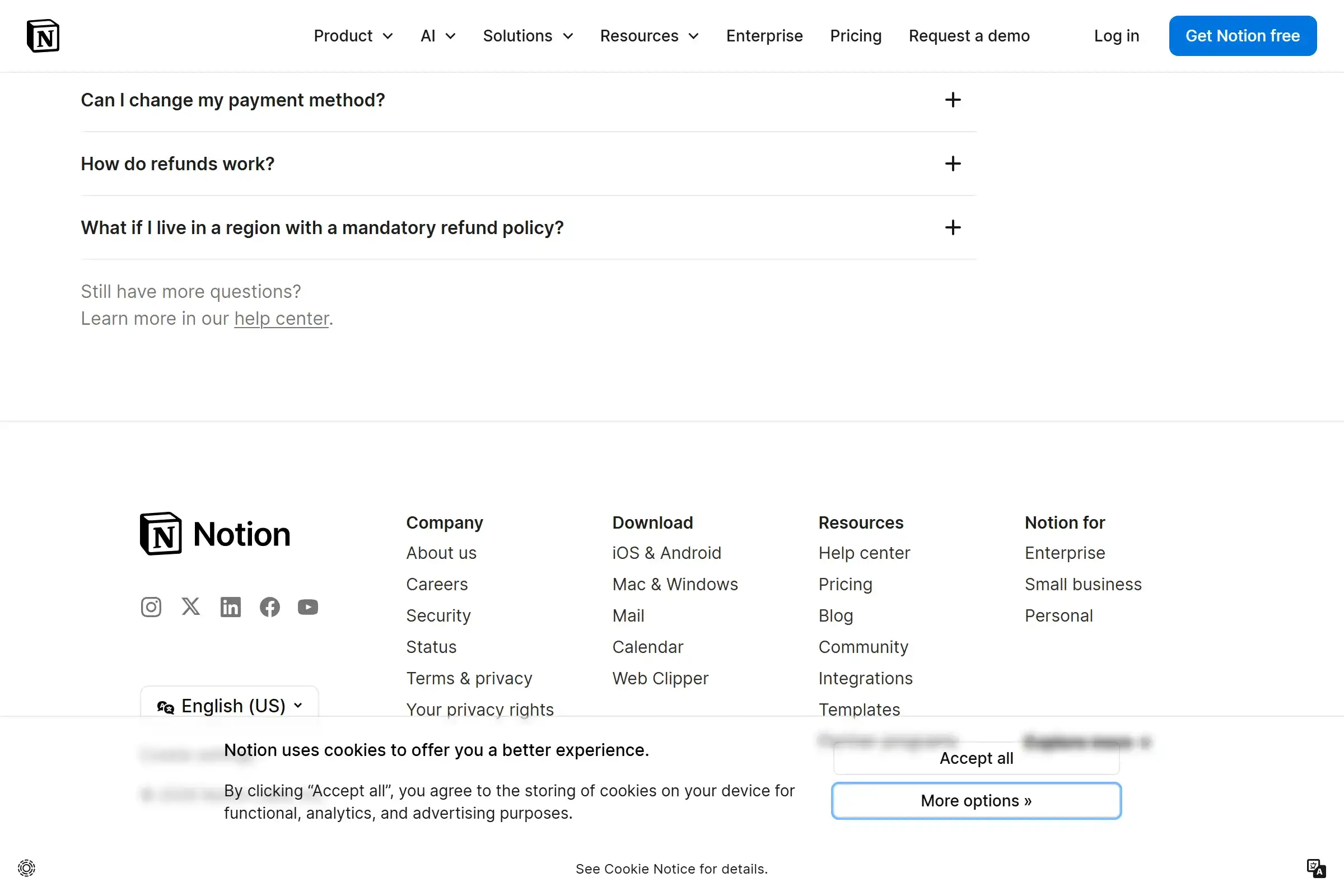
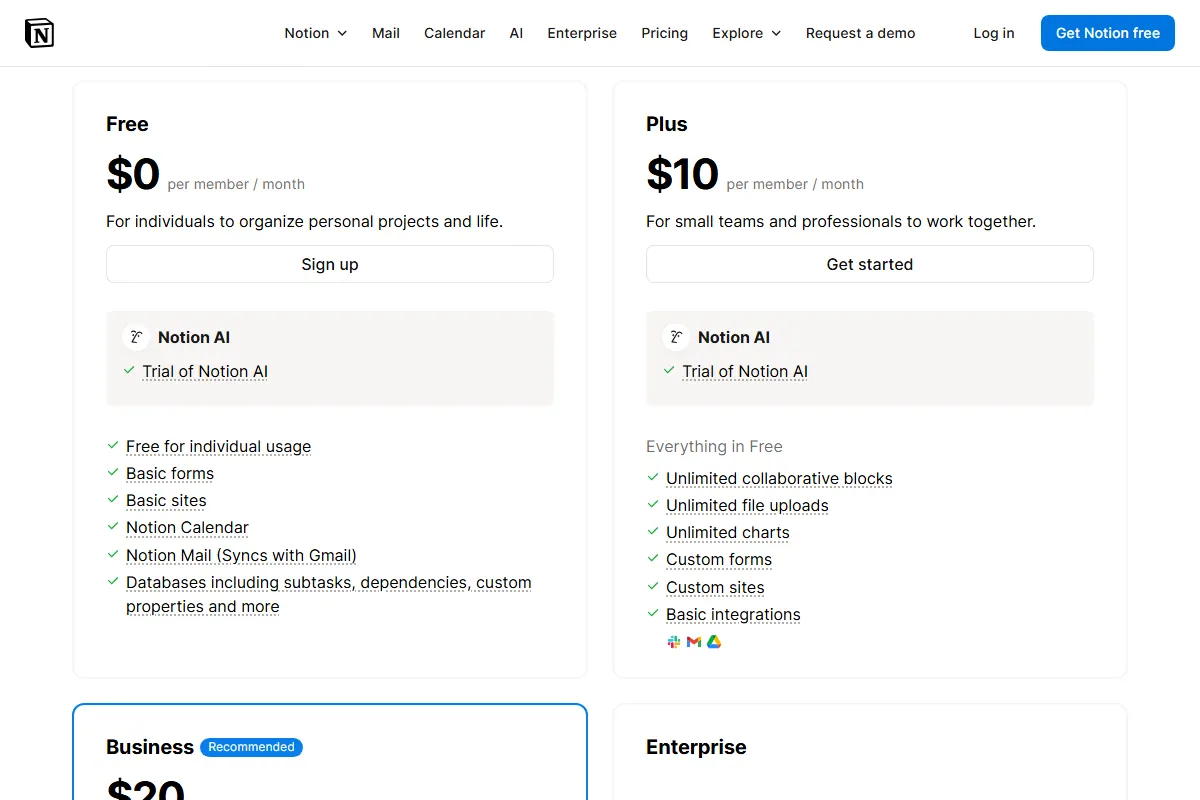
Notion pricing — per-seat billing for all plans. Screenshot captured March 2026.
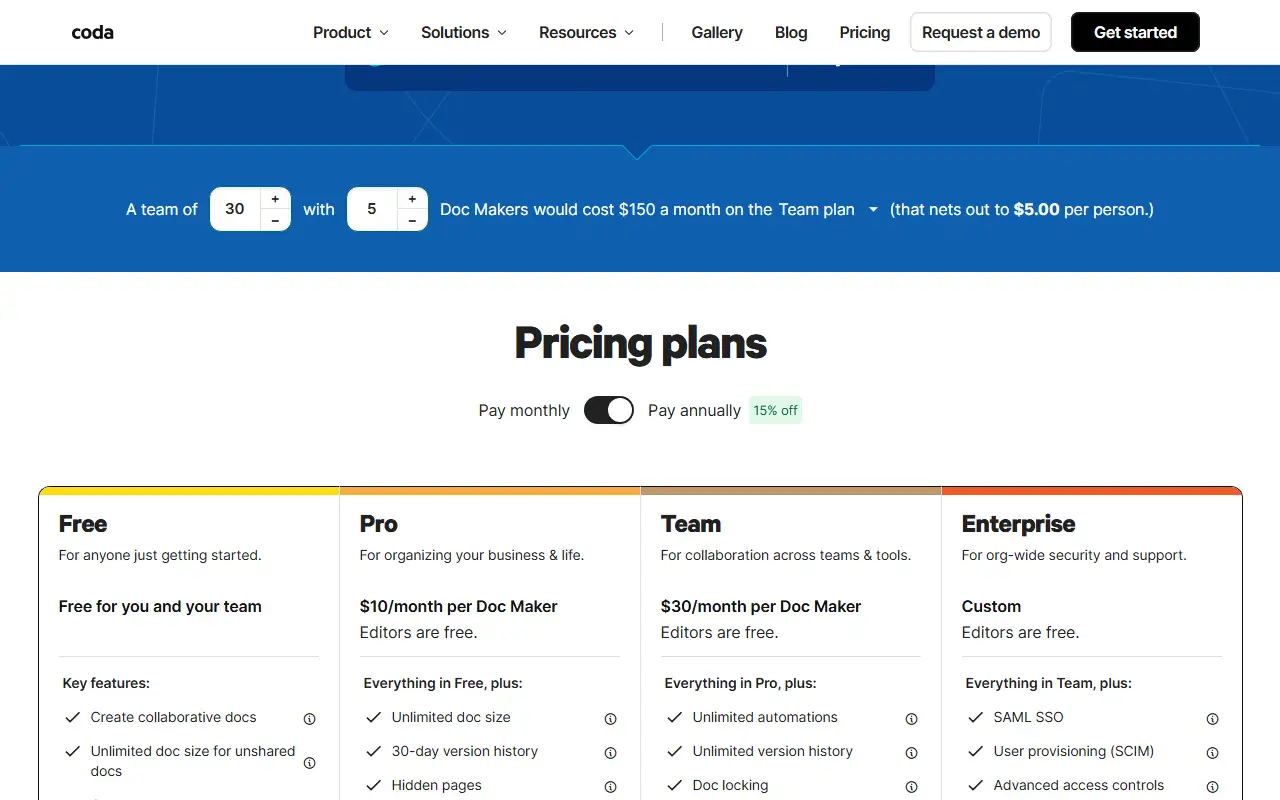
Coda pricing — only Doc Makers pay, editors and viewers are free. Screenshot captured February 2026.
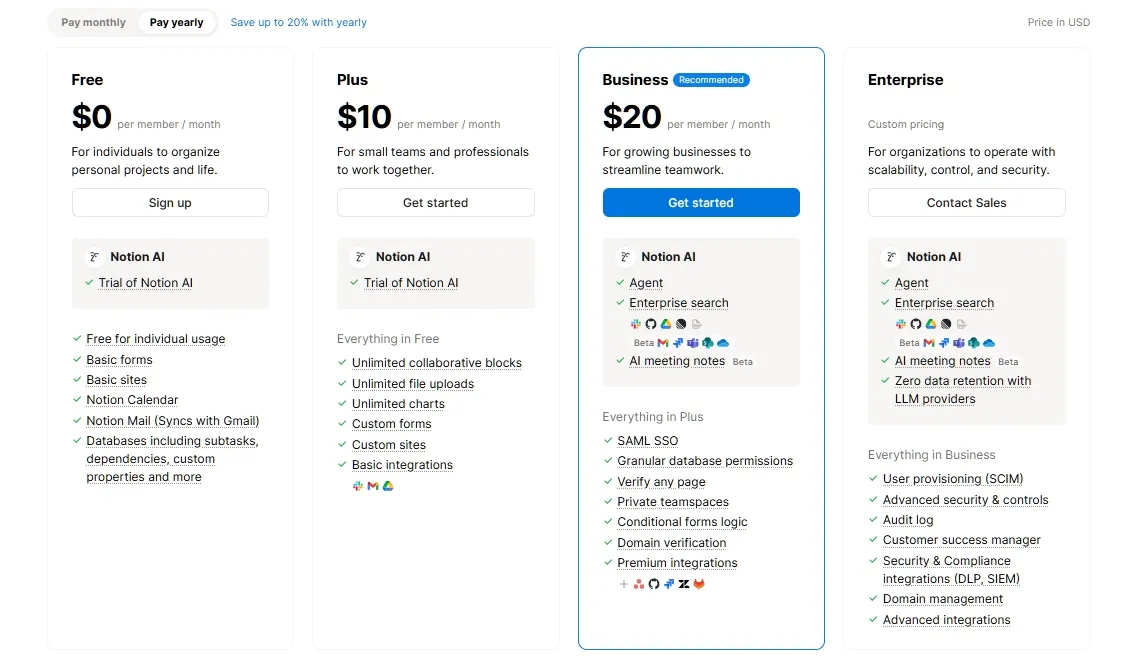
Notion annual plans — Plus saves 20% and Business saves 25% vs monthly billing.
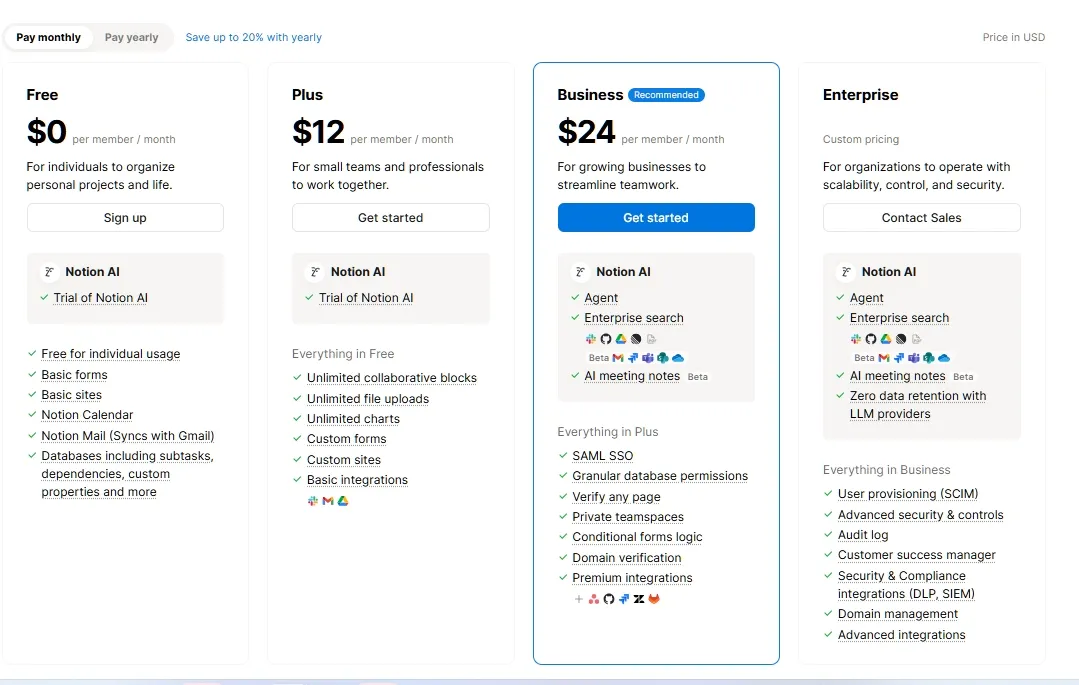
Notion monthly plans — higher per-month cost but no annual commitment required.
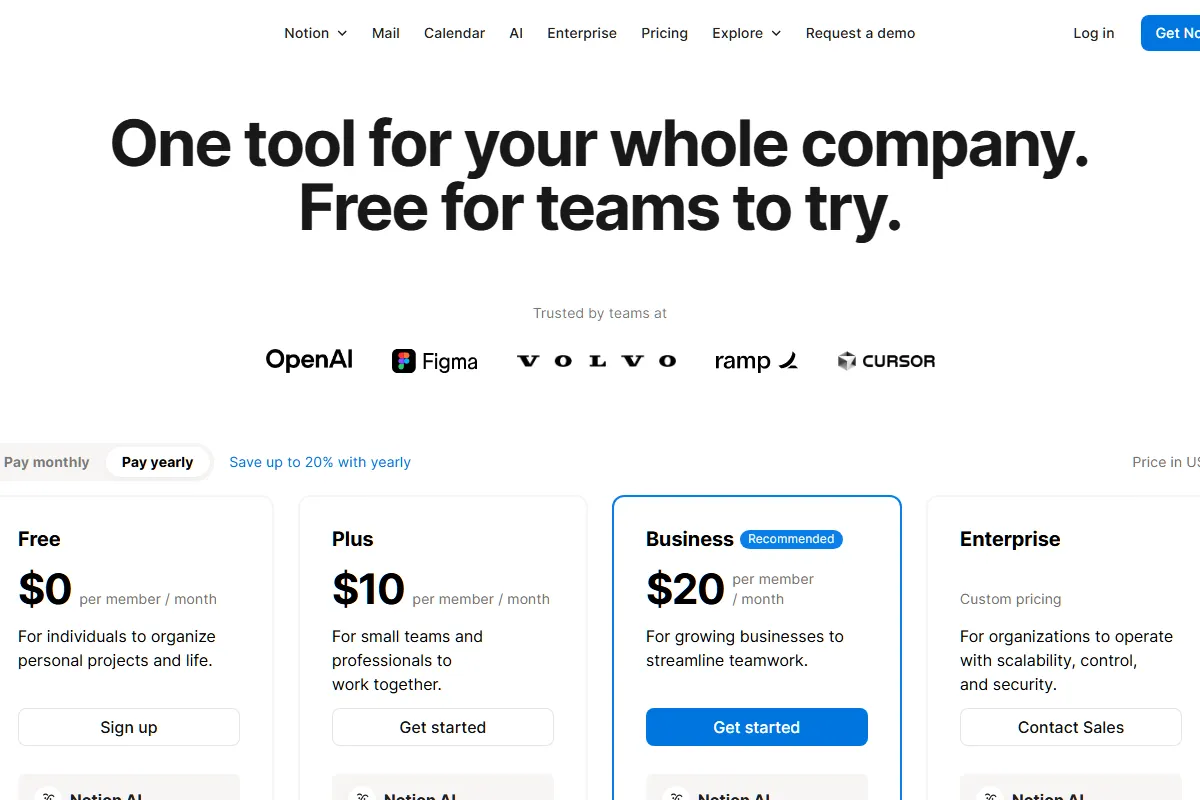
Notion pricing feature comparison — all plans side-by-side with feature availability.
Notion team cost calculator — shows how per-seat pricing scales with team size.
Why Compare Notion vs Coda?
Notion and Coda are the two leading "all-in-one workspace" tools competing to replace your wiki, project tracker, and lightweight database. Both start at $10/month, but their billing models create wildly different total costs depending on your team structure. This comparison helps you understand which model saves you more money.
Common Decision Points:
- Team structure: How many people create docs vs just read/edit?
- Budget sensitivity: Per-seat predictability vs potential maker billing savings
- Feature needs: Simple docs/wiki vs app-building with automations
- Offline requirements: Do team members need to work without internet?
- Ecosystem: Importance of templates, integrations, and community resources
- Migration effort: Existing content in Google Docs, Confluence, or similar tools
Our Methodology:
- Official pricing pages verified March 1, 2026
- Feature comparison based on current Free, paid, and Enterprise plans
- Cost scenarios calculated for 4 team sizes with different builder ratios
- Pricing history tracked via SaaS Price Pulse monitoring since 2022
- Community feedback aggregated from Reddit r/Notion and r/codaio
Notion charges per user regardless of activity level. Coda only charges "Doc Makers" — anyone who creates a new doc. Editors and viewers are always free on Coda. Both offer annual billing discounts: Notion saves ~17% annually, Coda saves ~17% on Pro and Team plans.
Detailed Pricing Comparison
Side-by-Side Plans
| Plan | Notion | Coda | Notes |
|---|---|---|---|
| Free | $0 (1 user, limited blocks for teams) | $0 (1 Doc Maker, unlimited editors) | Coda more generous for team use |
| Entry Paid | $10/user/mo (Plus, annual) | $10/maker/mo (Pro, annual) | Same price per person — but Coda only counts creators |
| Mid-tier | $15/user/mo (Business, annual) | $30/maker/mo (Team, annual) | Notion cheaper per person, but Coda has fewer paid seats |
| Enterprise | Custom pricing | Custom pricing | Both require sales conversation for SSO/audit |
🧮Cost Calculator: Real-World Scenarios
Solo Creator / Freelancer
1 person managing personal docs, project notes, client trackers
Both free plans work. Notion Free has unlimited pages with 5MB file limit. Coda Free has unlimited docs with row caps on shared docs. Choose based on UX preference — Notion for simplicity, Coda if you want automations.
Small Team — Equal Creators (10 people, all create docs)
Startup where everyone creates and manages their own docs
Notion. When everyone creates docs, Coda's Maker Billing offers zero advantage — and Notion Business ($15/seat) is half the cost of Coda Team ($30/maker) with comparable features.
Builder-Heavy Team (3 builders, 20 editors/viewers)
Ops team where a few people build systems, most people just use them
Coda, clearly. You pay for 3 seats instead of 23. This is exactly the team structure where Maker Billing shines. Annual savings of $2,400+ pays for itself many times over.
Mid-size Company (50 people, 10 builders)
Growing company with department leads building wikis and trackers
Coda saves significant money if you can keep Doc Maker count at 10. The risk: as the company grows, more people start creating docs and your maker count creeps up. Set clear policies early.
Annual Billing Savings
| Tool | Monthly | Annual | Savings |
|---|---|---|---|
| Notion Plus (annual) | $10/user | $96/user/year | 20% vs monthly ($12/mo) |
| Notion Business (annual) | $15/user | $144/user/year | 25% vs monthly ($20/mo) |
| Coda Pro (annual) | $10/maker | $120/maker/year | 17% vs monthly ($12/mo) |
| Coda Team (annual) | $30/maker | $360/maker/year | 17% vs monthly ($36/mo) |
Pro tip: Before choosing, count your team's "builders vs consumers" ratio. If more than 60% of your team creates docs, Notion's flat per-seat model is simpler and often cheaper. If less than 30% create docs, Coda's Maker Billing can save 50-80%. The sweet spot for Coda savings: 3-5 builders supporting 20+ consumers.
Feature Comparison
📋Quick Feature Breakdown
| Feature | Notion | Coda |
|---|---|---|
| Free Plan Generosity | ✅❌Unlimited pages, 5MB file limit | ✅❌Unlimited docs + free editors/viewers |
| Billing Model | •Per seat (all users pay) | •Maker Billing (only creators pay) |
| Offline Access | ❌Limited support | •None (cloud-only) |
| Built-in Automations | •Basic (database only) | •Advanced (buttons, rules, schedules) |
| AI Features | •$8-10/member add-on | ✅Included (credit-based) |
| Templates | •10,000+ | •500+ |
| App Building | ❌Limited | •Strong (no-code apps in docs) |
| Cross-doc Sync | •Synced databases | •Team plan ($30/maker) |
📋Core Features
| Feature | Notion | Coda | Price Impact |
|---|---|---|---|
| Documents & Wiki | ✅Excellent — block-based editor | •Good — doc-centric with tables | Comparable |
| Database / Tables | •Relational databases with views | •Tables with cross-doc sync | Notion more flexible views |
| Automations | •Basic (database triggers only) | •Advanced (buttons, rules, schedules) | Coda saves Zapier costs |
| App Building | ❌Limited (database-centric) | •Strong (buttons, formulas, Packs) | Coda unique capability |
| AI Features | •$8-10/member/mo add-on | ✅Included (credit-based) | Notion AI adds significant cost |
| Offline Access | ❌Limited offline mode | ❌None | Notion only option |
| Version History | •7-30-90 days by plan | ✅❌7-30-unlimited by plan | Coda Team has unlimited |
| Integrations | •100+ native integrations | •600+ Packs | Coda wider integration via Packs |
Feature Deep Dives
Billing Model
Notion
Notion charges every user who accesses a paid workspace. Free guests allowed (limited to 10 on Plus, 250 on Business), but internal team members need paid seats.
Included in: All paid plans | Limits: 10 guests (Plus), 250 guests (Business)
Coda
Coda only charges "Doc Makers" — people who create new docs. Editors who modify existing docs and viewers are completely free, unlimited.
Included in: All paid plans | Limits: Anyone clicking "New Doc" becomes a Doc Maker
Winner: Depends on team - Coda wins for builder-consumer teams (3 builders, 20 editors). Notion wins for teams where everyone creates docs. The ratio matters more than the tool.
Automations & Workflows
Notion
Notion offers database automations: trigger on property change, send notifications, update status. Limited to database events — no custom buttons or scheduled actions without third-party tools.
Included in: All plans (limited on Free) | Limits: Database triggers only, no buttons or schedules
Coda
Coda has built-in automation rules (if-this-then-that), button-triggered actions, scheduled automations, and cross-doc syncing. Can replace Zapier for many workflows.
Included in: Limited on Free/Pro, unlimited on Team | Limits: Unlimited automations require Team plan ($30/maker)
Winner: Coda - Coda's automation engine is significantly more powerful. If your team currently pays for Zapier ($20-50/mo) to automate Notion workflows, Coda Team may actually cost less total.
Template & Community Ecosystem
Notion
Notion has over 10,000 community templates, a massive creator ecosystem, and extensive YouTube tutorials. Easy to find templates for any use case.
Included in: Free and paid | Limits: Some premium templates cost money
Coda
Coda has ~500 templates in their gallery. Smaller community but more focused on workflow automation templates.
Included in: Free and paid | Limits: Smaller selection, fewer third-party creators
Winner: Notion - Notion's ecosystem is 20x larger. For teams that rely on community templates and tutorials for onboarding, this matters a lot.
Pricing History: How Stable Are These Tools?
Notion Price Changes
| Date | Change | Impact |
|---|---|---|
| 2018 | Notion 2.0 launch with personal free plan | Free for individuals, team plans paid |
| 2020 | Personal Pro plan made free, teams $8/user/month | Massive user growth from free plan |
| 2022 | Introduced Plus ($8/user), Business ($15/user), Enterprise | Restructured tiers, added mid-range option |
| 2023 | Plus increased from $8 to $10/user/month | +25% increase on entry paid plan |
| 2024 | Notion AI launched as paid add-on ($8-10/member/month) | New revenue stream, significant cost for teams |
Notion has increased prices modestly since 2022. The Plus plan went from $8 to $10 (25% increase over 2 years). The bigger cost impact is Notion AI as a paid add-on — adding $8-10/member/month on top of plan costs.
Coda Price Changes
| Date | Change | Impact |
|---|---|---|
| 2019 | Coda launched with free and paid tiers | Early per-workspace billing model |
| 2021 | Introduced Maker Billing model | Only Doc Makers pay — revolutionary pricing shift |
| 2023 | Pro plan price adjusted, Coda AI launched | Credit-based AI included in plans |
| 2024 | Team plan enhanced with unlimited automations | Better value at same price point |
| 2025 | Current pricing stable: Pro $10, Team $30 | No changes for 12+ months |
Coda's Maker Billing model has been stable since 2021 introduction. Pro at $10/maker and Team at $30/maker have held steady. Feature improvements (more automations, Packs) have increased value without price increases.
Price Stability Winner: Coda
- Notion raised Plus from $8 to $10 (+25%) while Coda held prices steady
- Notion AI adds $8-10/member as separate cost vs Coda AI included in plan
- Coda's Maker Billing model unchanged since 2021 launch
- Both tools have improved features without proportional price increases
For budget planning, price stability matters. Coda's 4-year stable pricing makes costs predictable. Notion's recent AI add-on adds $96-120/user/year — a hidden cost that can exceed the base plan price for small teams.
Data Source: SaaS Price Pulse historical tracking since 2022 + Archive.org snapshots for earlier data
Recommendation: Which Tool Should You Choose?
Choose Notion If:
Ideal User Profile:
- Teams where most people create and manage docs
- Need offline access for remote or travel work
- Want a large template ecosystem for quick setup
- Prefer simpler UX over advanced customization
- Already invested in Notion (migration cost is real)
Best For:
- Company wiki / knowledge base - Superior page organization, better search, 10,000+ templates
- Product documentation - Clean editing experience, great for technical writing
- Simple project management - Database views (Kanban, Calendar, Timeline) cover 80% of PM needs
- Remote teams needing offline access - Only option with any offline support
Expected Cost: $10-15/user/month ($120-180/user/year) + $8-10 for AI add-on
Choose Coda If:
Ideal User Profile:
- Teams with clear builder-consumer split (few creators, many readers)
- Need built-in automations without Zapier/Make
- Want to build lightweight internal tools in docs
- Budget-conscious teams with 20+ people
- Ops/project managers who build systems for others to use
Best For:
- Internal tools and workflows - Buttons, automations, and Packs replace simple internal apps
- Teams with 80%+ readers - Maker Billing means 80% of your team is free
- Replacing Zapier + wiki combo - Built-in automations + docs in one tool saves $20-50/month
- Structured data workflows - Cross-doc syncing and formulas handle complex data flows
Expected Cost: $10-30/maker/month ($120-360/maker/year), editors free
Consider Neither If:
- Need a serious project management tool → Try Consider Linear ($8/user) or Asana ($10.99/user) for dedicated PM
- Need a real database for 50,000+ records → Try Consider Airtable ($20/user) or a proper database solution
- Need advanced spreadsheet calculations → Try Stick with Google Sheets or Excel — both Notion and Coda have formula limitations
- Heavily Jira-dependent team → Try Consider Confluence ($6.05/user) for tight Jira integration
The Hybrid Approach
Use Notion as the company wiki (everyone reads, simpler UX) and Coda for department-specific workflow tools (built by ops team, used by everyone). This leverages Notion's ecosystem for knowledge and Coda's automations for process.
Cost: Notion Plus ($10/user × all) + Coda Pro ($10/maker × few builders)
When your wiki and workflow tools serve different purposes and your team can handle two tools. Works best in 50+ person companies where departments have different needs.
Frequently Asked Questions
Pricing Questions
What is Coda's Maker Billing and how does it compare to Notion's pricing?
Is Notion or Coda cheaper in 2026?
Does Notion AI cost extra?
Can I use Notion or Coda for free?
Feature Questions
Can Coda replace Notion as a company wiki?
Which has better automations — Notion or Coda?
Does either tool work offline?
Migration & Use Case Questions
Can I migrate from Notion to Coda (or vice versa)?
Which is better for project management?
Track These Tools
Both Notion and Coda have adjusted pricing since launch. Track historical changes and get notified when pricing updates.
Word Count: ~2800 | Last Updated: 2026-03-01