
Coda Pricing 2026: Plans & Reviews
All-in-one doc platform
🔔 Get alerted the next time Coda changes its price
Instant email + Slack alerts on real price changes. From $19/month.
Quick Verdict
Bottom Line
Coda's 'Maker Billing' model is genuinely clever: only people who create docs pay, while unlimited editors and viewers are free. The Free plan is generous for solo use (unlimited docs), but once your team needs automations, cross-doc syncing, or version history beyond 30 days, you're looking at $10–$30/maker/month. The catch: if everyone on your team creates docs, it costs the same as per-seat pricing. From our monitoring data, we've seen this pricing hold steady since 2021 — best value when you have a few builders and many consumers.
Who Should Use It
- Teams where 2-3 people build docs and 20+ people just use them
- Ops/project managers replacing spreadsheet chaos with structured apps
- Startups that want docs + lightweight database + automations in one tool
- Anyone tired of paying per-seat when most users just read docs
Who Should Skip It
- Teams where everyone creates docs equally (per-seat tools may be cheaper)
- Developers needing a real database or API-first platform
- Companies requiring offline access (Coda is cloud-only)
- Users who need advanced spreadsheet formulas (Excel/Sheets is still better)
Our Monitoring Data
Coda is one of the newer additions to our monitoring pipeline — we began tracking its pricing page in early 2026. The Maker Billing model has remained stable since its 2021 introduction, and our initial snapshots confirm Pro at $10/maker/month and Team at $30/maker/month with no changes detected so far.
What is Coda?
Coda markets itself as "the doc that brings it all together" — combining documents, spreadsheets, and lightweight app-building into one workspace. Think Notion meets Google Sheets meets a simple no-code app builder.
The key differentiator is Coda's unique billing model: you only pay for "Doc Makers" (people who create and structure documents). Everyone else — editors, commenters, viewers — is free. This makes Coda potentially very cost-effective for teams with a few power users building tools for a larger group.
Founded in 2014 by former YouTube/Google executive Shishir Mehrotra, Coda has raised over $400M in funding. It's used by teams at Uber, Square, and Figma for everything from meeting notes to full internal tools.
Where Coda really shines: building custom workflows without code. You can create a doc that acts as a project tracker, CRM, or wiki — with buttons, automations, and integrations built in. Where it struggles: raw spreadsheet power (Excel wins) and offline access (doesn't exist).
Key Features That Affect Pricing
| Feature | Free | Pro | Business |
|---|---|---|---|
| Unlimited docs | ✅ | ✅ | ✅ |
| Doc Makers included | 1 | Paid per maker | Paid per maker |
| Editors & Viewers | Free | Free | Free |
| Automations | Limited | ✅ | Unlimited |
| Version history | 7 days | 30 days | Unlimited |
| Cross-doc syncing | ✅ |
What Makes Coda Different
- 1Maker Billing: Only doc creators pay – Unlike Notion or Confluence where every user needs a seat, Coda only charges for people who build docs. If you have 3 doc makers and 50 editors, you pay for 3 seats — not 53.
- 2Doc-powered apps without code – Build interactive tools (project trackers, approval workflows, custom CRMs) inside a document. Buttons trigger automations, tables sync across docs, and formulas power calculations.
- 3Deep integrations via Packs – Coda Packs connect to Slack, Jira, GitHub, Google Calendar, and 600+ services. Data syncs both ways — your doc stays updated automatically.
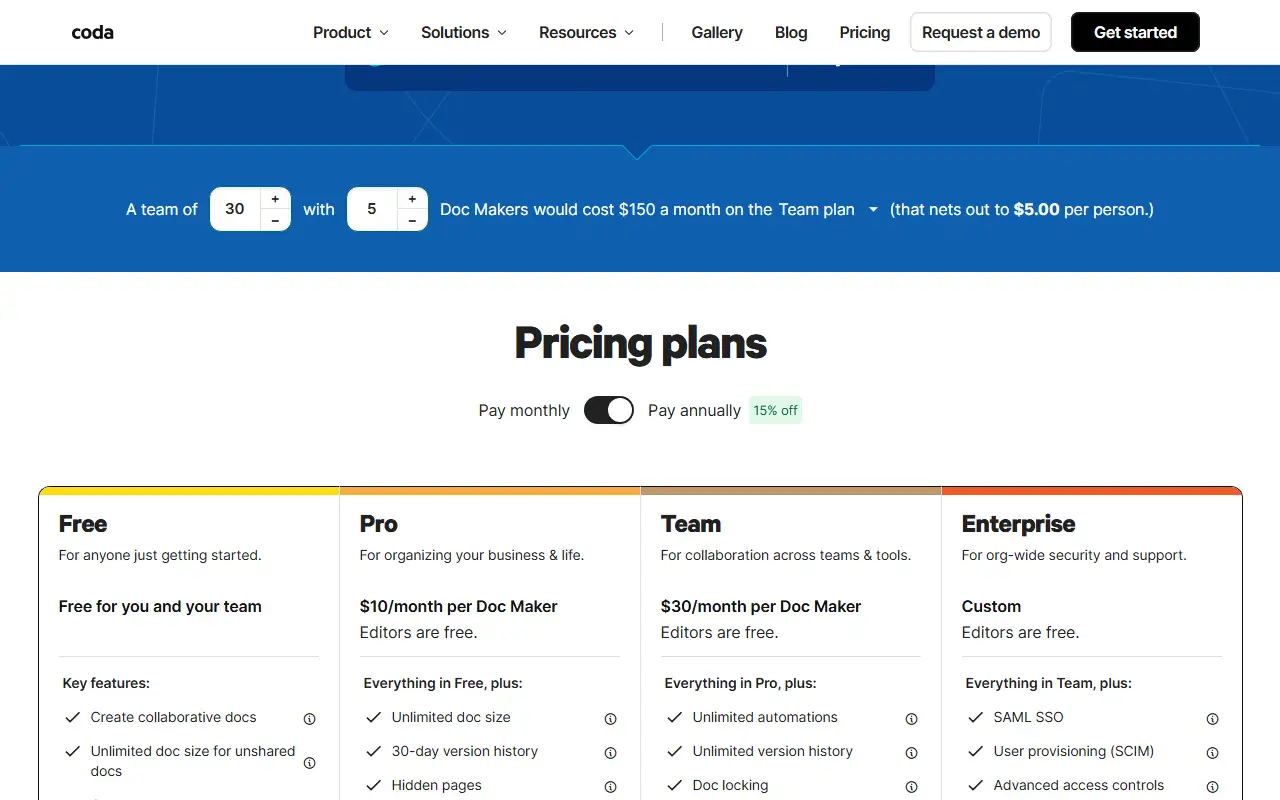
Coda Pricing Plans 2025
Free
Best for: Solo users and small teams exploring Coda
- Unlimited docs (no size limit for unshared)
- Tables, charts, forms, and basic formulas
- 1 Doc Maker included
- Unlimited editors and viewers
- Coda AI trial included
Value Analysis: Surprisingly capable for personal use. You can build complex docs with tables, formulas, and buttons. The limitation kicks in when you need team-level features like version history and automations.
Pro
Best for: Small teams with a few power users building docs
- Unlimited doc size on shared docs
- 30-day version history
- Hidden pages for organization
- Custom domains and branding
- Pro Packs (integrations)
- Coda AI credits included
Value Analysis: The sweet spot for most small teams. At $10/maker/month, if you have 3 doc makers and 20 viewers, you're paying $30/month total — Notion would cost $80+ for the same team size.
Team
Best for: Growing teams needing automations and access control
- Unlimited automations
- Unlimited version history
- Doc locking
- Folder access management
- Cross-doc syncing
- Team Packs + group training
- More Coda AI credits
Value Analysis: Worth the jump from Pro if your team relies on automations and needs cross-doc syncing. The $20/maker premium pays for itself if you're replacing Zapier automations.
Enterprise
Best for: Large organizations needing security and compliance
- SAML SSO and user provisioning
- Advanced access controls
- Audit events and compliance
- SOC 2 report access
- Enterprise Packs
- Dedicated expert access
- Maximum Coda AI credits
Value Analysis: Standard enterprise tier. The SSO/audit requirements force the upgrade for regulated industries. Pricing is typically negotiated based on team size.
Hidden Costs to Watch Out For
- 1. Doc Maker role creep: Anyone who creates a new doc becomes a Doc Maker. If your team culture encourages everyone to create docs, you'll end up paying for every seat — negating the billing advantage.
- 2. Coda AI is credit-based: AI features use credits that vary by plan. Heavy AI users may need higher tiers or additional credits. Free plan only includes a trial.
- 3. Pack limitations on lower tiers: Some integrations (Packs) require Pro or higher. If you need Jira or Salesforce sync, factor in the Pro plan cost.
Pro tip: Keep your Doc Maker count low by training your team to use templates created by power users instead of creating docs from scratch. One Doc Maker can build templates that 50 editors customize without triggering a billing upgrade.
Pros & Cons
Pros
- Maker Billing saves money for read-heavy teams – If your org has 5 builders and 50 consumers, you pay for 5 seats instead of 55. That's a 90% discount vs per-seat pricing.
- All-in-one replaces 3+ tools – Coda can replace your wiki (Notion), project tracker (Asana), and simple database (Airtable) in one tool. Less context-switching, fewer subscriptions.
- Powerful automations built-in – If-this-then-that rules, scheduled actions, and button-triggered workflows — without needing Zapier or Make as middleware.
- Formula language is approachable – Coda's formula language feels like a friendlier version of Excel formulas. You can do lookups, filters, and calculations without learning a programming language.
Cons
- Performance degrades on large docs – Docs with 10,000+ rows or heavy cross-references can feel sluggish. If you need true database scale, Airtable or a real DB is better.
- No offline access – Coda is cloud-only. No internet = no work. Notion at least has limited offline support.
- Learning curve for advanced features – Building Coda 'apps' with buttons, automations, and cross-doc sync requires significant investment. It's not as intuitive as dragging blocks in Notion.
- Maker billing can backfire – In collaborative teams where everyone creates docs, every user becomes a Doc Maker — and suddenly you're paying full per-seat pricing anyway.
Our Take
From our early monitoring data, Coda's Maker Billing model has remained stable since its 2021 introduction — no surprise price hikes. It's the best value in the 'all-in-one workspace' category IF your team has a clear builder-consumer split. The model is genuinely innovative and can save 50-80% vs Notion or Confluence for the right team structure. But if everyone creates docs, the cost advantage disappears. I'd recommend trying the Free plan first — it's generous enough to validate whether Coda fits your workflow before committing to Pro.
Is Coda Right for You?
Solo user / Freelancer
Free plan is enough for personal docs and client project tracking
Recommended: Free
Monthly cost: $0
Small team (5-15 people)
Pro plan with 2-3 Doc Makers. Editors are free. Total: $20-30/month.
Recommended: Pro
Monthly cost: $20-30
Replaces Notion ($8/seat × 15 = $120/mo) + potential Zapier savings
Mid-size team (20-50 people)
Team plan for unlimited automations and cross-doc sync. 5-10 Doc Makers.
Recommended: Team
Monthly cost: $150-300
Replaces project management tool + wiki + simple automations in one subscription
Enterprise (100+ people)
Enterprise for SSO, audit logs, and compliance. Negotiate maker count.
Recommended: Enterprise
Monthly cost: Custom (typically $15-40/maker)
Skip Coda If:
- •You need offline access — Coda doesn't work without internet
- •Your team handles 50,000+ row datasets — use Airtable or a real database
- •Everyone creates docs equally — per-seat tools like Notion may be simpler to budget
- •You need advanced spreadsheet formulas — stick with Excel or Google Sheets
Coda Alternatives & Competitors
| Tool | Starting Price | Free Tier | Best For | Key Difference |
|---|---|---|---|---|
| CurrentCoda | Free / $10-30/maker/mo | Teams with few builders, many consumers | Only Doc Makers pay — editors and viewers are free | |
| Notion | Free / $8-15/user/mo | All-purpose workspace for everyone | Per-seat pricing, better offline support, simpler UX | |
| Airtable | Free / $20-45/user/mo | Structured data and relational databases | True relational database, better for large datasets, more expensive | |
| Confluence | Free / $6.05/user/mo | Jira-integrated team wikis | Deep Jira integration, enterprise-focused, less flexible than Coda |
Detailed Comparisons
Coda vs Notion
Your team has a builder-consumer split (saves 50-80% on seats) and you need built-in automations without Zapier
Everyone on your team creates content equally, or you need offline access and a simpler learning curve
Coda vs Airtable
You want docs + database + automations in one tool and your data fits in a doc-centric model
You need true relational database features, 100K+ row tables, or complex data workflows
Coda vs Confluence
You want a modern, flexible workspace with app-building capabilities beyond basic wiki pages
Your team is deeply invested in Jira and needs tight issue-tracking integration
Frequently Asked Questions
Pricing
What is a Doc Maker in Coda and why does it matter for pricing?
How much does Coda cost per month in 2026?
Is Coda really free?
Can I avoid paying for Doc Makers?
Features
Can Coda replace Notion?
Does Coda have AI features?
Does Coda work offline?
Similar Productivity & Project Management Tools
Notion
All-in-one workspace
$10/user/month (Plus), $15/user/month (Business)
Asana
Work management platform
$10.99/user/month (Premium), $24.99/user/month (Bu
Trello
Visual collaboration tool
$5/user/month (Standard), $10/user/month (Premium)
Jira
Project and issue tracking
$7.75/user/month (Standard), $15.25/user/month (Pr
Track Coda Pricing
Get instant alerts when Coda changes pricing. Never miss an update.