

Codeium Free Tier Limits 2026: What You Get (& Paid Plans)
Codeium free tier: unlimited autocomplete, limited chat. Pro $15/mo, Enterprise pricing per user. Official 2026 pricing verified with change history since launch.
The AI coding assistant market exploded in 2024-2025. GitHub Copilot added a free tier, Codeium rebranded to Windsurf, and Cursor went from unknown to the hottest developer tool of the year. We analyzed 13,000+ pricing page snapshots from Archive.org to bring you the most comprehensive pricing comparison available. Here's what every plan actually costs—and what you're really getting.
📋 Key Findings (TL;DR)
- ✓ Best Free Tier: GitHub Copilot Free (2,000 completions/month) beats all competitors
- ✓ Best Value at $10-20/mo: GitHub Copilot Pro ($10) or Cursor Pro ($20)
- ✓ Best for Power Users: Cursor Ultra ($200/mo) for 20x AI model usage
- ✓ Enterprise Winner: GitHub Copilot Enterprise ($39/user) is cheapest with most features
- ✓ Major 2025 Changes: Codeium → Windsurf rebrand, Sourcegraph Cody discontinued for individuals
Complete Pricing Comparison Table
| Tool | Free | Individual | Team/Business | Enterprise |
|---|---|---|---|---|
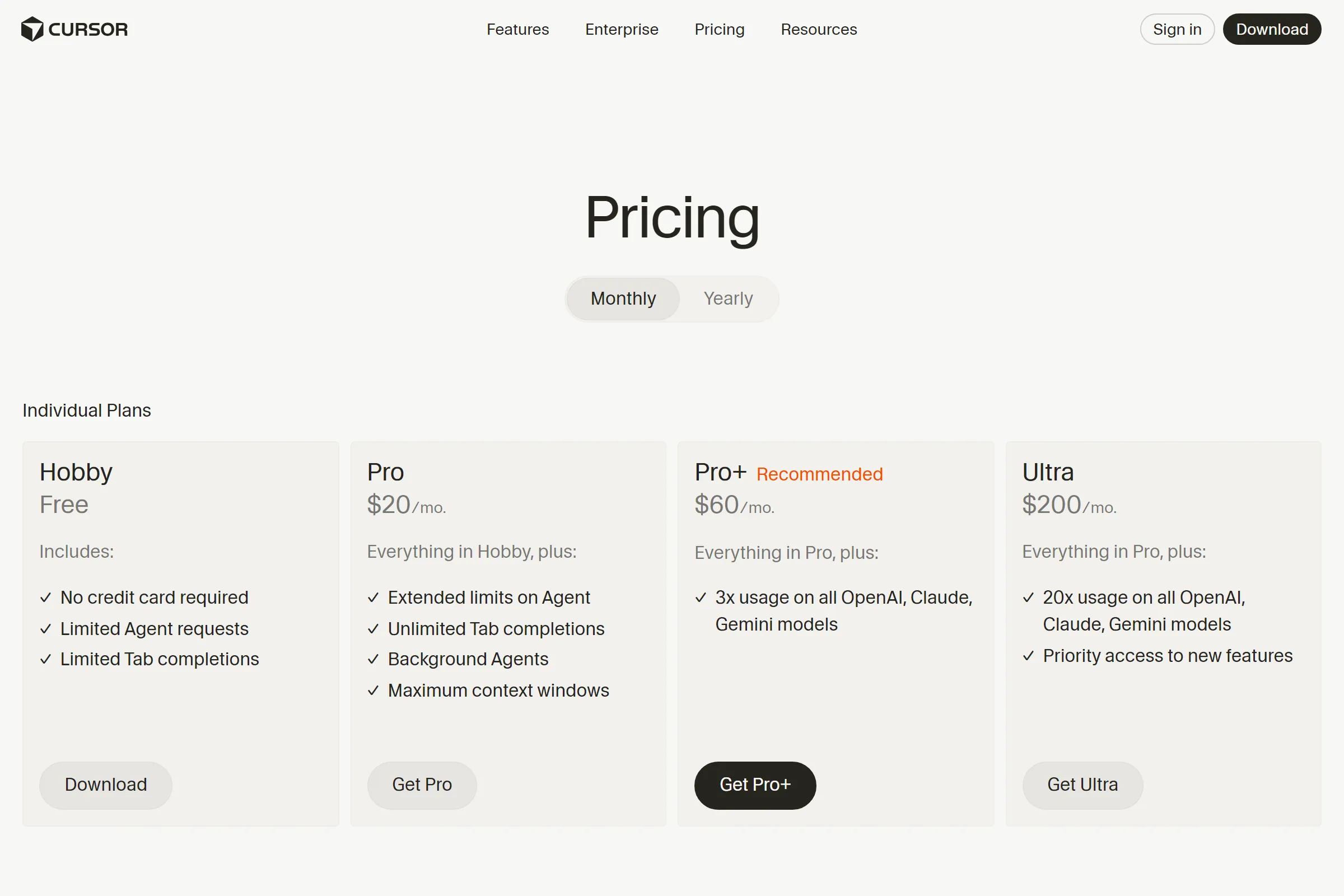
| Cursor | $0 (limited) | $20/mo | $40/user/mo | Custom |
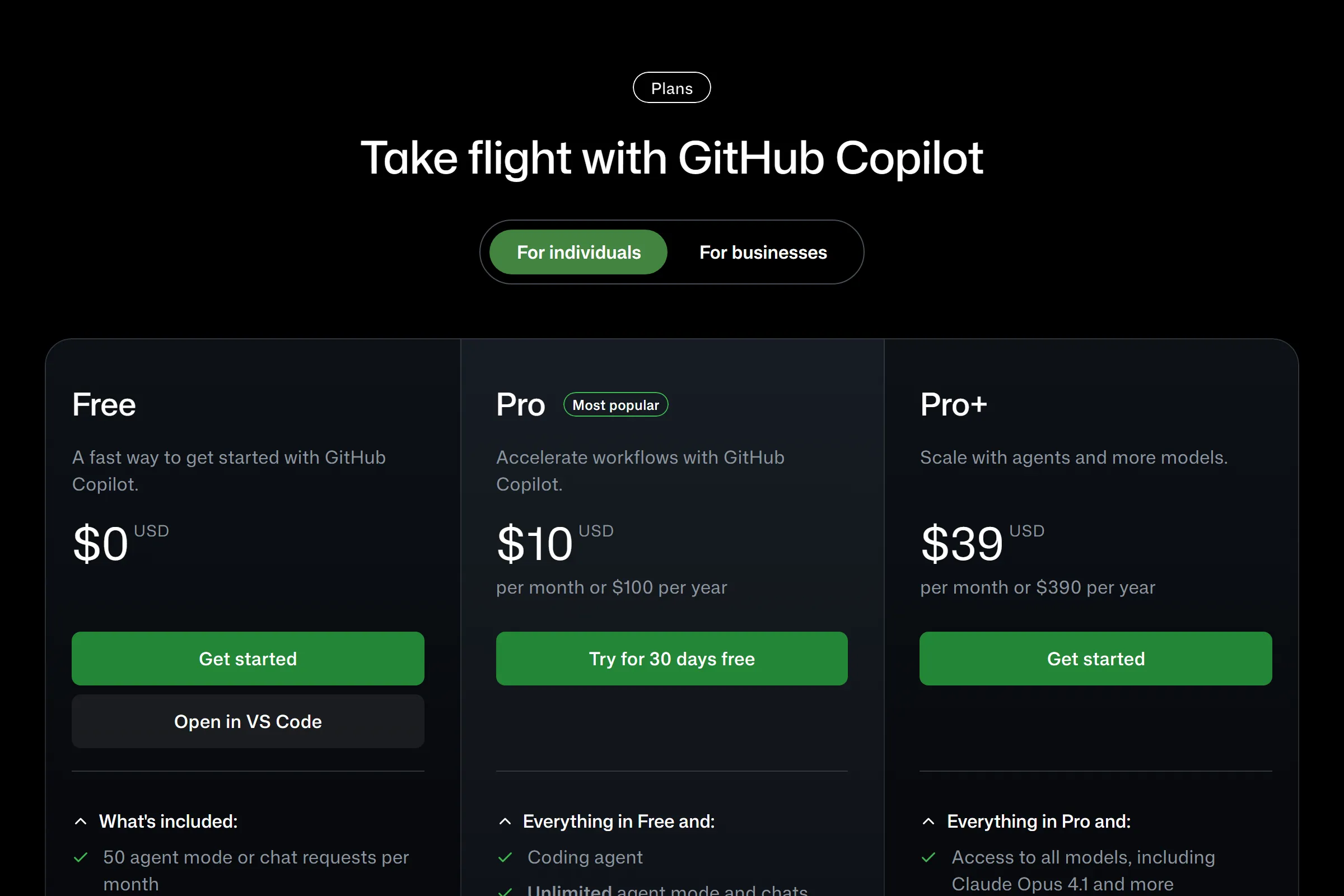
| GitHub Copilot | $0 (2K completions) | $10/mo ⭐ | $19/user/mo | $39/user/mo |
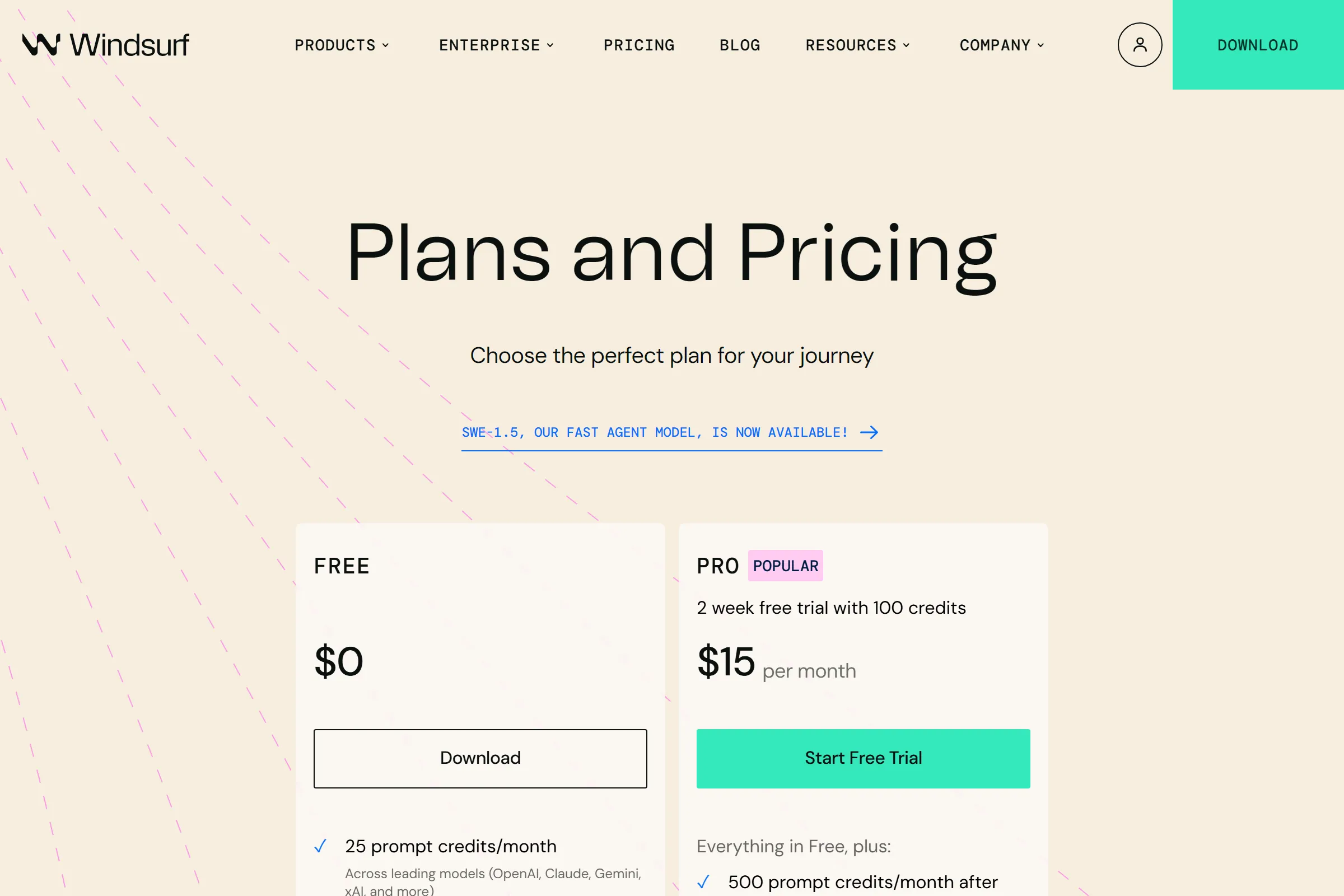
| Windsurf (ex-Codeium) | $0 (25 credits) | $15/mo | $30/user/mo | Custom |
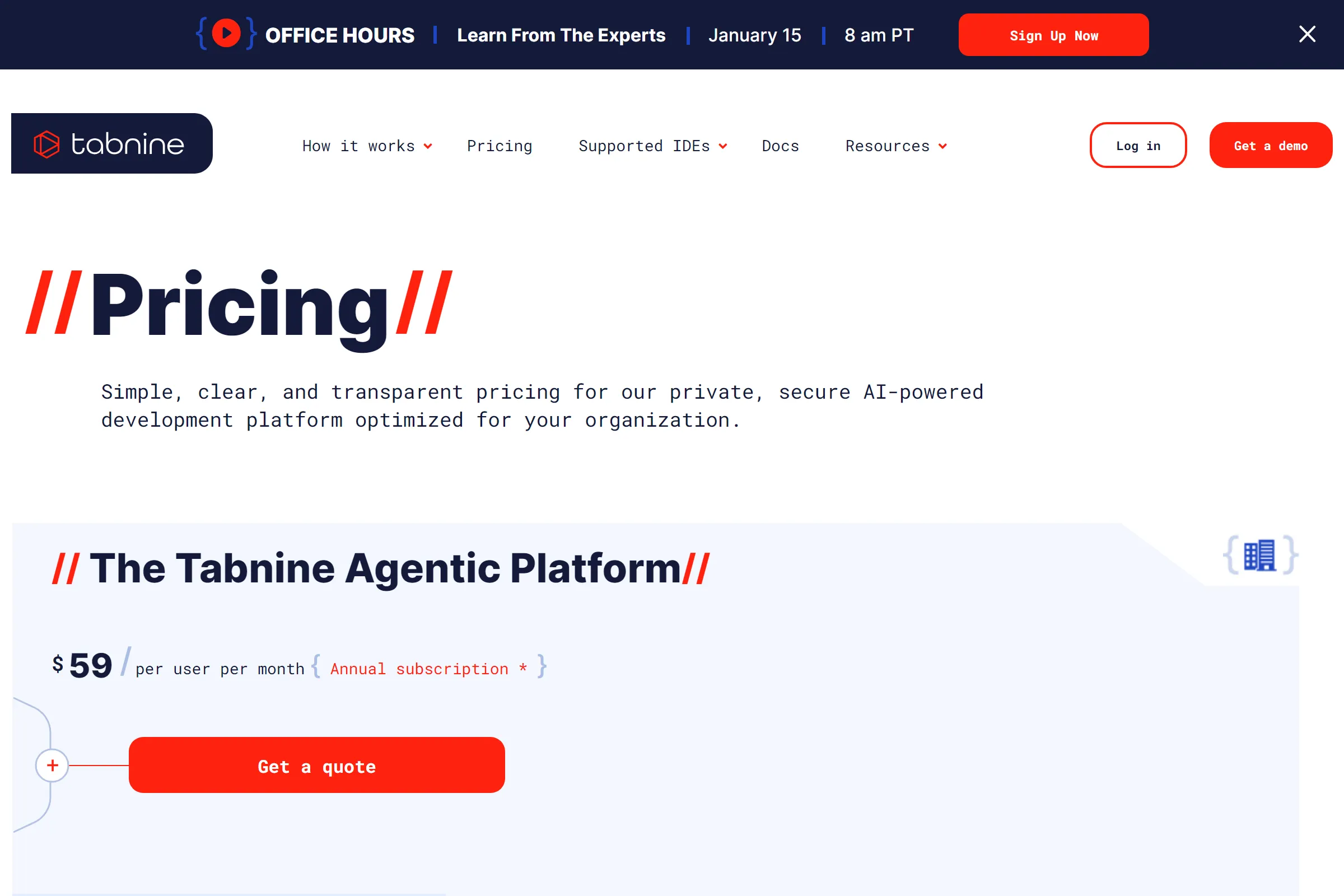
| Tabnine | — | — | $59/user/mo | Custom |
| Sourcegraph Cody | ❌ Discontinued | ❌ Discontinued | — | $59/user/mo |
Prices verified January 2026. Annual billing may offer 10-20% savings.
1. Free Tier Wars: What You Actually Get
Every AI coding assistant now offers a free tier—but the limits vary wildly. Here's what you actually get for $0:
GitHub Copilot Free (Best Free Tier)
- 2,000 code completions/month — Most generous limit
- 50 chat requests/month — Basic Q&A with AI
- Access to GPT-4o-mini model
- Works in VS Code, JetBrains, Neovim
Reality check: 2,000 completions sounds like a lot, but active developers hit this limit in 1-2 weeks. Each Tab completion counts, so rapid coding burns through the quota fast.
Cursor Hobby (Most Restrictive)
- Limited Agent requests — Unclear daily/monthly cap
- Limited Tab completions — Runs out quickly
- No credit card required
- Good for evaluation, not daily use
Reality check: Cursor's free tier is designed to get you hooked, not for sustained use. Most developers upgrade within a week.
Windsurf Free (Credit-Based)
- 25 credits/month — Credit system is confusing
- Access to all premium models (same as paid)
- Unlimited Cascade features within credit limits
Reality check: 25 credits sounds terrible, but Windsurf's credits last longer than expected because basic completions don't consume credits. Complex agentic tasks do.
💡 Pro Tip: If you're just evaluating, start with GitHub Copilot Free—it has the highest limits. Switch to Cursor only after you've decided AI coding is worth paying for.
2. The $10-20 Sweet Spot
Most individual developers land in this price range. Here's what each dollar buys you:
GitHub Copilot Pro — $10/month (Best Value)
- Unlimited code completions — No limits, ever
- 300 premium requests/month — For GPT-4, Claude, etc.
- Access to multiple AI models (not locked to one)
- Code review capabilities
- Coding agent features
At $10/month, GitHub Copilot Pro is objectively the best value for most developers. Unlimited completions alone is worth it—you'll never hit a wall mid-project.
Windsurf Pro — $15/month
- 500 credits/month — Much better than free tier
- Same model access as free
- Additional credits: $10 for 250
- SWE-1.5 model included
Windsurf sits in an awkward middle ground—more expensive than Copilot, fewer features than Cursor. The credit system adds uncertainty about actual monthly usage.
Cursor Pro — $20/month (Developer Favorite)
- Unlimited Tab completions — The killer feature
- Extended Agent limits — For complex refactoring
- Background Agents
- Maximum context windows
- Everything in Hobby tier
Cursor Pro is $10 more than Copilot Pro, but many developers swear the AI quality and agentic features justify the premium. The "unlimited Tab completions" is Cursor's main advantage—Copilot Pro has unlimited too, but Cursor's completions feel more intelligent for complex codebases.
Our recommendation: Start with GitHub Copilot Pro at $10/month. If you find yourself wanting better multi-file context and agentic features, upgrade to Cursor Pro. The $10/month difference is worth it for heavy users.
3. Premium & Ultra Tiers ($60-200/mo)
For power users who push AI coding to its limits, premium tiers offer significantly more capacity:
Cursor Pro+ — $60/month
- 3x usage on all OpenAI, Claude, Gemini models
- Everything in Pro
- For developers who hit Pro limits regularly
Cursor Ultra — $200/month
- 20x usage on all AI models
- Priority access to new features
- Effectively unlimited for any workflow
Who needs Ultra? If you're using Cursor for 8+ hours/day with heavy Agent usage, Pro limits can become annoying. Ultra eliminates all friction—but $200/month is steep for individuals. Most Ultra users are either:
- Freelancers billing $100+/hour (AI pays for itself)
- Content creators building AI coding tutorials
- Companies expensing tools for key engineers
4. Enterprise Pricing Breakdown
For teams buying seats, pricing per user matters more than feature lists:
| Tool | Team Price | Enterprise Price | Key Enterprise Features |
|---|---|---|---|
| GitHub Copilot | $19/user/mo | $39/user/mo ⭐ | IP indemnity, Claude Opus 4.1, GitHub Spark |
| Cursor | $40/user/mo | Custom | SCIM, Audit logs, AI code tracking API |
| Windsurf | $30/user/mo | Custom | Hybrid deployment, volume discounts |
| Tabnine | $59/user/mo | Custom | On-prem, air-gapped, zero code retention |
| Sourcegraph Cody | — | $59/user/mo | Enterprise-only, code search integration |
Enterprise winner: GitHub Copilot Enterprise at $39/user/month offers the most features at the lowest public price. For a 50-person team, that's $1,950/month vs $2,950/month for Tabnine—a $12,000/year difference.
Exception: If your company requires on-premises deployment or has strict "no cloud" policies, Tabnine is the only option with true air-gapped support.
5. Deep Dive: Cursor
Cursor emerged from nowhere in 2023 to become the most-hyped AI coding tool of 2024-2025. Here's what made it special—and whether the hype is justified:
The Cursor Story
Founded by ex-Meta and Stripe engineers, Cursor launched as a fork of VS Code with AI deeply integrated. Unlike Copilot (which adds AI to existing editors), Cursor rebuilt the entire editing experience around AI:
- Multi-file context — AI understands your entire codebase
- Agentic refactoring — Ask "refactor this to TypeScript" and watch it work
- Chat in editor — No context switching to browser
Cursor Pricing Evolution
Based on our 359 Archive.org snapshots (June 2024 - January 2026):
| Date | Change |
|---|---|
| Jun 2024 | Pro tier at $20/mo established |
| Late 2024 | Pro+ ($60/mo) and Ultra ($200/mo) tiers added |
| 2025 | Teams ($40/user/mo) and Enterprise pricing formalized |
| 2025 | Bugbot add-on introduced ($40/user/mo) |
Notable: Cursor's core $20/mo Pro pricing has remained stable since launch—unusual in the rapidly evolving AI market. The company added higher tiers rather than raising base prices.
Is Cursor Worth $20/mo Over Copilot's $10?
The extra $10/month buys you:
- Better multi-file understanding — Cursor's codebase indexing is superior
- Agentic features — "Background Agents" can work while you do other things
- Editor integration — AI is native, not bolted on
Our verdict: If you work on complex projects with many files, Cursor's extra $10/month pays for itself in time saved. For simple scripts or learning to code, Copilot Pro is plenty.
6. Deep Dive: GitHub Copilot
GitHub Copilot launched in June 2022 and remains the market leader by user count. With GitHub's distribution advantage (100M+ developers), Copilot is the default choice for most teams.
Copilot Pricing Evolution
We tracked 12,082 Archive.org snapshots of Copilot's pricing pages:
| Date | Change |
|---|---|
| Jun 2022 | Launch at $10/mo individual, $19/user/mo business |
| Feb 2023 | Enterprise tier added at $39/user/mo |
| Dec 2024 | Free tier introduced (2K completions/mo) |
| 2025 | Pro Plus tier added (1,500 premium requests) |
Key insight: Copilot's core $10/mo pricing hasn't changed since 2022—remarkable stability. The free tier addition in late 2024 was a competitive response to Cursor's growth.
Copilot's Strategic Advantage
GitHub Copilot has unfair advantages competitors can't match:
- Distribution: 100M+ GitHub users can enable Copilot in 2 clicks
- Training data: Access to all public GitHub code (controversial but powerful)
- Integration: Native GitHub PR reviews, issue understanding
- Enterprise trust: Microsoft's security and compliance reputation
7. Hidden Costs & Gotchas
Cursor Hidden Costs
- Bugbot is separate: Code review costs an additional $40/user/mo
- Ultra is expensive: Heavy users can hit Pro limits, forcing $200/mo upgrade
- Learning curve: Cursor is a new editor—expect productivity dip while learning
GitHub Copilot Hidden Costs
- Premium requests: Heavy chat users burn through 300/month quickly
- Model lock-in: Best models require Enterprise tier
- GitHub dependency: Maximum value requires GitHub ecosystem (vs GitLab/Bitbucket)
Windsurf Hidden Costs
- Credit confusion: Hard to predict monthly costs with credit system
- Brand risk: Codeium → Windsurf rebrand raises questions about long-term stability
- Add-on creep: Fast Context costs extra ($10/user/mo)
Tabnine Hidden Costs
- No free tier: Must commit to $59/user/mo minimum
- LLM costs: Using your own LLM is "unlimited" but requires infrastructure
- Enterprise-only focus: Solo developers are not the target market
8. Which Should You Choose?
Decision Matrix
Choose GitHub Copilot if:
- You're budget-conscious ($10/mo vs $20)
- Your team already uses GitHub
- You want the safest, most established option
- You primarily need code completion (not agentic features)
Choose Cursor if:
- You work on complex multi-file projects
- You want the best AI reasoning for refactoring
- You're willing to learn a new editor
- You value "agentic" AI that can make multi-step changes
Choose Windsurf if:
- You want a middle ground: more than Copilot, less commitment than Cursor
- The credit system works for your usage pattern
- You're interested in the Cascade agentic features
Choose Tabnine if:
- Your company requires on-premises deployment
- You have strict "no cloud" policies
- IP protection and zero code retention are non-negotiable
Cost Comparison: 1-Year Total
| Scenario | Copilot | Cursor | Windsurf |
|---|---|---|---|
| Solo developer (Pro) | $120/yr | $240/yr | $180/yr |
| 10-person team (Business) | $2,280/yr | $4,800/yr | $3,600/yr |
| 50-person team (Enterprise) | $23,400/yr | Custom | Custom |
9. Frequently Asked Questions
Is the free tier enough for learning to code?
Yes, for beginners. GitHub Copilot Free's 2,000 completions/month is plenty when you're learning. You'll spend more time understanding code than generating it. Upgrade to paid when you're coding daily and hitting limits.
Why is Cursor more expensive than Copilot?
Cursor is a standalone editor (fork of VS Code), not just a plugin. The company argues that deeper AI integration justifies the $10/month premium. Many power users agree—Cursor's agentic features are genuinely more capable for complex refactoring.
What happened to Codeium? Why is it now Windsurf?
Codeium rebranded to Windsurf in 2025 to emphasize their agentic AI editor approach (similar to Cursor). The core team and technology remain the same—it's a marketing/positioning shift, not a new company.
Why did Sourcegraph discontinue Cody Free and Pro?
Sourcegraph announced in mid-2025 that Cody Free and Pro would be discontinued by July 23, 2025. The company is focusing exclusively on enterprise customers ($59/user/month minimum). Individual developers should migrate to Copilot, Cursor, or Windsurf.
Which tool is best for VS Code users?
GitHub Copilot if you want to stay in VS Code. Cursor if you're willing to switch editors (it's a VS Code fork, so the transition is easy). Most Cursor users report adapting in 1-2 days.
Do any tools work offline?
Tabnine is the only major option with true offline/air-gapped support. All others require internet connectivity. Tabnine's on-premises deployment runs entirely within your infrastructure.
Will AI coding assistants get cheaper?
Unlikely in the short term. AI model costs are decreasing, but companies are adding features faster than costs drop. GitHub Copilot's free tier suggests price pressure is real, but core paid tiers ($10-20/month) have been stable for years.
Is Cursor worth $200/month (Ultra)?
Only for heavy users who hit Pro limits regularly. If you're a freelancer billing $100+/hour, the productivity gains justify it. For most developers, $20/month Pro is sufficient. Try Pro first—upgrade only if you're constantly hitting limits.
About This Analysis
This pricing guide was compiled by the SaaS Price Pulse research team using 13,000+ Archive.org snapshots across all major AI coding assistants. We track pricing changes daily across 260+ SaaS tools.
Data sources: Archive.org Wayback Machine, official pricing pages, company announcements, and our proprietary snapshot database. All prices verified January 2026.
📚 Related Reading
Last updated: February 26, 2026. Prices and features are subject to change. Always verify on official websites before making purchasing decisions.
Share this article
Start Tracking SaaS Pricing Today
Never miss a competitor pricing change. Get instant alerts and stay ahead.
Start Tracking Free →