
Render Pricing 2026: Plans & Reviews
Cloud platform
🔔 Get alerted the next time Render changes its price
Instant email + Slack alerts on real price changes. From $19/month.
Quick Verdict
Bottom Line
Render is one of the simplest ways to host a full-stack app (web service + background worker + database) with predictable, plan-based pricing. It’s especially attractive if you want a permanent free tier for static sites and a straightforward upgrade path to paid web services.
Who Should Use It
- Developers who want simple, plan-based hosting (less usage surprise)
- Teams shipping web services + cron jobs/background workers
- Projects that need a permanent free option for static sites
- Anyone comparing Railway vs Render for ‘what will this cost?’
Who Should Skip It
- Apps that need global edge/region-per-request deployment (consider Fly.io)
- Teams that require deep Kubernetes-level control
- Workloads with heavy bandwidth/egress sensitivity (watch network costs)
What is Render?
Render is a cloud hosting platform that focuses on “it just works” deployments for web services, static sites, background workers, and managed databases.
The practical difference vs usage-first platforms is that Render is easier to budget for: you pick an instance type/plan, then scale up when you outgrow it. For most small teams, that simplicity matters more than theoretical cost-optimization.
If you’re coming from Heroku: Render feels familiar. If you’re comparing with Railway: Render typically feels more predictable (plan-based), while Railway often wins on developer experience and speed.
Key Features That Affect Pricing
| Feature | Free | Pro | Business |
|---|---|---|---|
| Static sites | ✅ (permanent) | ✅ | ✅ |
| Web services | Limited/varies | ✅ | ✅ |
| Background workers | ✅ | ✅ | |
| Managed databases | Limited/varies | ✅ | ✅ |
| Custom domains + HTTPS | ✅ | ✅ | ✅ |
| Deploy from GitHub | ✅ | ✅ | ✅ |
What Makes Render Different
- 1More predictable monthly cost – Render is easier to budget for because most of the cost maps to a chosen plan/instance instead of pure usage. That’s a big win when you’re trying to avoid surprise bills.
- 2Permanent free tier for static sites – If you’re hosting docs/landing pages or lightweight frontends, a permanent free option helps you ship fast without committing to recurring spend.
- 3Full-stack primitives (service + worker + DB) – Render fits common architectures: a web service, a background worker, and a database—managed in one place.
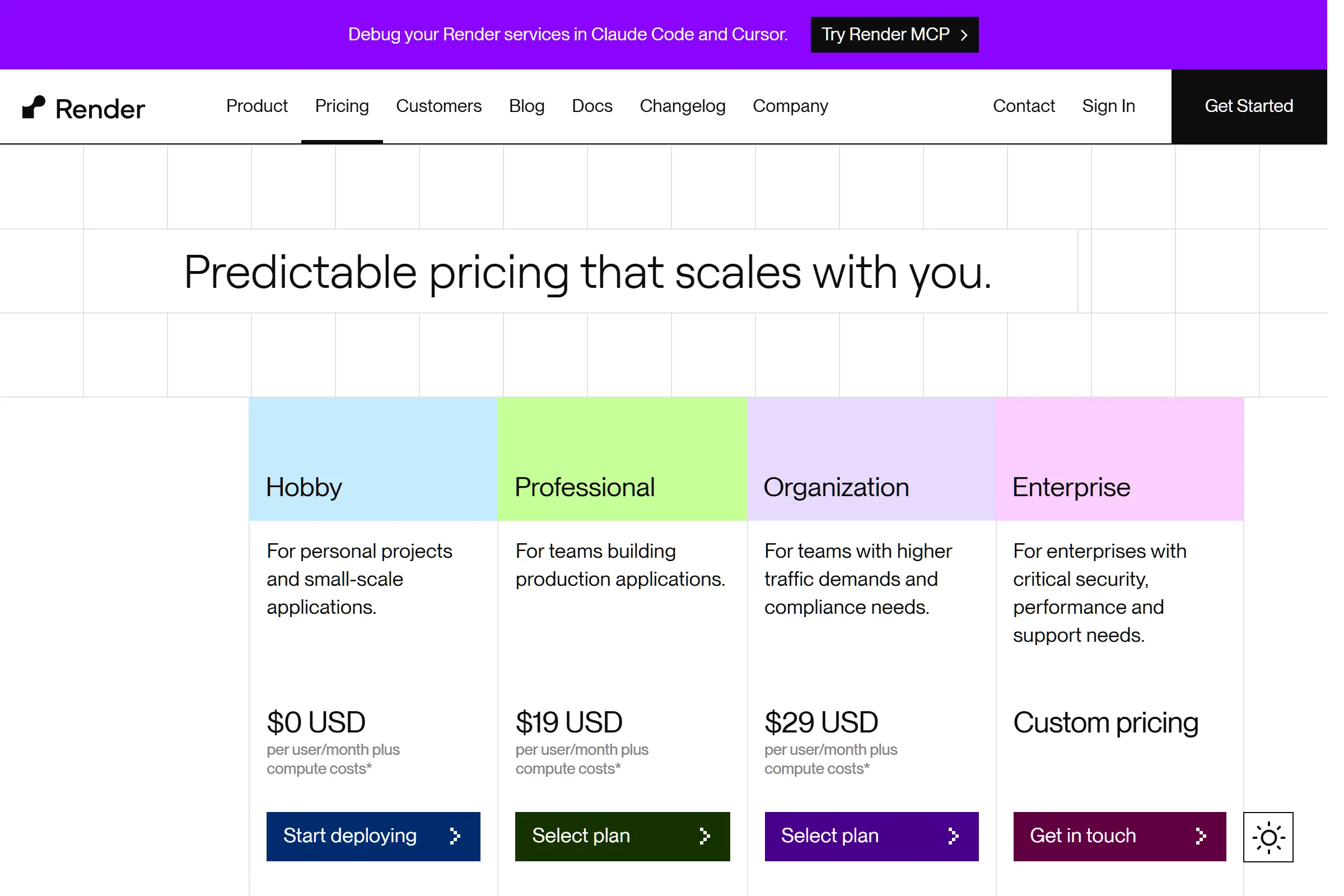
Render Pricing Plans 2025
Free
Best for: Static sites, prototypes, and experimenting
- Static site hosting (free)
- Deploy from GitHub
- Custom domains + HTTPS
Value Analysis: Great for shipping a real public site with zero cost. Treat it as a ‘launch fast’ option—not a long-term backend plan.
Starter (Web Service)
Best for: Small production web services where predictability matters
- Always-on web service
- Deploy hooks and rollbacks
- Basic scaling path
Value Analysis: This is the ‘real backend’ entry point most people mean by ‘Render pricing’. Budget increases as you add workers, databases, or larger instances.
Team / Higher tiers
Best for: Teams needing stronger performance, collaboration, and production reliability
- Higher instance sizes
- More controls
- Team workflows
Value Analysis: If you’re already getting traffic, prioritize uptime and rollback safety over shaving a few dollars. The real cost is outages.
Hidden Costs to Watch Out For
- 1. Extra services add line items: A ‘cheap’ web service becomes more expensive when you add a background worker, a managed database, and staging environments. Count the number of services you’ll run.
- 2. Bandwidth/egress considerations: If your product serves lots of media or large downloads, network costs can matter. Track bandwidth early.
- 3. Database sizing: Databases often drive your bill faster than the web service. Plan for storage growth and backup needs.
Pro tip: Price Render by architecture, not by a single plan: count (1) web service, (2) worker, (3) DB, plus (4) staging. That prevents 90% of ‘why is it more expensive than I expected?’ surprises.
Pros & Cons
Pros
- Predictable pricing mental model – Plan-based costs are easier for founders to budget than pure usage-based hosting.
- Permanent free for static sites – You can keep docs/marketing on Render without paying monthly.
- Good fit for typical SaaS architecture – Web service + worker + DB is a common setup, and Render supports it cleanly.
Cons
- Costs scale with service count – One app with multiple services (api, worker, cron, staging) can add up even when each is ‘cheap’.
- Less ‘instant DX’ than the fastest platforms – Depending on your stack, you may find other platforms feel quicker for iteration, previews, and day-1 setup.
Our Take
If your primary goal is predictable hosting costs and a permanent free tier for static sites, Render is a strong default. If you’re optimizing for the fastest developer workflow, compare it directly with Railway.
Is Render Right for You?
Indie builders
Use free static sites for marketing/docs and a single paid web service when you need an always-on backend.
Recommended: Free + Starter
Monthly cost: $0–$7/month (plus add-ons)
Ship fast without surprise infra complexity
Early-stage SaaS
Treat staging as a first-class cost: you’ll likely run at least 2 environments. Choose plans that keep deploys and rollbacks safe.
Recommended: Starter + Team tiers
Monthly cost: $7+/service
Predictable spend + reliable deploys
Teams
Prioritize reliability and collaboration features; the cost of production incidents dwarfs small plan differences.
Recommended: Higher tiers
Monthly cost: Varies
Less downtime, safer releases
Skip Render If:
- •You need edge-first deployment (pick Fly.io)
- •You need deep infra customization (self-host/Kubernetes)
Render Alternatives & Competitors
| Tool | Starting Price | Free Tier | Best For | Key Difference |
|---|---|---|---|---|
| CurrentRender | Free / $7+ per service | Predictable hosting costs, full-stack SaaS | Plan-based pricing + permanent free static sites | |
| Railway | $5–$20/mo + usage | Fastest DX, built-in databases | Usage-based with credits; very fast workflow | |
| Fly.io | Free / usage-based | Edge + global deployment | Region/edge flexibility | |
| Vercel | Free / $20+ | Frontend/Next.js | Frontend platform; pair with a backend host |
Detailed Comparisons
Render vs Railway
You want more predictable plan-based billing and a permanent free tier for static sites.
You want the fastest developer experience and don’t mind usage-based credits.
Render vs Fly.io
You want a simpler, more traditional hosting model and don’t need edge-first deployment.
You need multi-region/edge deployment characteristics.
Frequently Asked Questions
Pricing
Does Render have a permanent free tier in 2025?
Why is my Render bill higher than I expected?
Comparison
Render vs Railway: which is cheaper?
Similar Development & DevOps Tools
GitHub
Code hosting platform
$4/user/month (Team), $21/user/month (Enterprise)
GitLab
DevOps platform
$29/user/month (Premium), $99/user/month (Ultimate
Bitbucket
Git repository hosting
$3/user/month (Standard), $6/user/month (Premium)
Vercel
Frontend deployment platform
$20/user/month (Pro), $40/user/month (Enterprise)
Track Render Pricing
Get instant alerts when Render changes pricing. Never miss an update.