
Browse AI Pricing 2026: Plans & Reviews
AI-powered web scraping and monitoring platform with self-healing robots. 770,000+ users.
Key Facts
- Current price:
- $19-87/month (paid plans), Free tier available
- Pricing model:
- Credit-based subscription tiers
- Plans available:
- 4
- Free tier:
- Yes — 50 credits/month, 2 websites, 3 users
- Data source:
- Official Browse AI pricing page
Quick Verdict
Bottom Line
Browse AI is a no-code web scraping platform with self-healing AI that automatically adapts when websites change their layout. The free plan gives you 50 credits/month (enough for ~500 rows of data). Paid plans start at $19/month (annual) or $48/month (monthly) for 2,000 credits. The standout feature is self-healing — your scrapers keep working even when target websites redesign their pages, which is a unique capability no competitor offers. With 770,000+ users, it's the most popular no-code scraping tool on the market.
Who Should Use It
- Non-technical teams that need web data without writing code
- E-commerce businesses monitoring competitor pricing automatically
- Market researchers tracking product listings and reviews at scale
- Agencies managing data extraction for multiple clients
Who Should Skip It
- Developers who want full control over scraping logic (use Apify at $39/mo)
- Teams needing social media automation specifically (use PhantomBuster at $69/mo)
- High-volume users extracting millions of rows monthly (custom solutions cheaper)
- Budget-constrained users who only need occasional scraping (free tools exist)
Our Monitoring Data
We use web scraping techniques similar to Browse AI's approach to monitor pricing pages across 260+ SaaS tools. From our experience, the single biggest time sink in scraping is maintaining selectors when websites redesign — something Browse AI's self-healing AI directly addresses. We've seen pricing pages change layout 2-3 times per year on average, and each change can break extractors for hours until manually fixed.
What is Browse AI?
Browse AI is an AI-powered web scraping platform that lets anyone extract data from websites without writing code. Founded in 2020, it has grown to 770,000+ users (source: <a href="https://www.browse.ai">browse.ai</a>, verified March 2026) by solving web scraping's biggest pain point: maintenance. Browse AI's self-healing AI automatically adapts when websites change — a capability no competitor offers.
You select data via a point-and-click interface and Browse AI creates a "robot" to extract it on schedule. According to <a href="https://www.g2.com/products/browse-ai/reviews">G2 reviews</a> (4.86/5, 36+ verified reviews), ease of use is the top-rated quality. Based on <a href="https://help.browse.ai/en/articles/10440592-how-are-credits-calculated">Browse AI's help center</a>, one credit extracts 10 rows or 1 screenshot, but "premium sites" cost 2-10 credits per task. Prices verified via <a href="https://www.browse.ai/pricing">browse.ai/pricing</a> — paid plans start at $19/month (annual). Browse AI complements analytics tools like <a href="/tools/hotjar">Hotjar</a> and <a href="/tools/mixpanel">Mixpanel</a> by capturing competitor data, sitting between manual collection and developer-heavy tools like <a href="/tools/ahrefs">Ahrefs</a> or <a href="/tools/similarweb">SimilarWeb</a>.
Key Features That Affect Pricing
| Feature | Free | Pro | Business |
|---|---|---|---|
| Monthly credits | 50 | 2,000 (Personal) | 5,000+ (Professional) |
| Websites monitored | 2 | 5 | 10 |
| Team members | 3 | 3 | 10 |
| Self-healing AI | ✅ | ✅ | ✅ |
| Residential proxies | ✅ | ✅ | ✅ |
| Scheduled monitoring | ✅ | ✅ | ✅ |
| Priority support | ❌ | ❌ | ✅ |
| Data export | CSV | CSV + API | CSV + API + Webhooks |
What Makes Browse AI Different
- 1Self-Healing AI (Only Browse AI Has This) – When a target website changes its HTML structure, Browse AI's AI automatically detects the change and updates your robot's selectors. Competitors like Apify and Octoparse require manual maintenance when this happens, which can break data pipelines for hours or days.
- 2No-Code Point-and-Click Setup – Navigate to any website in Browse AI's browser, click on the data you want to extract, and the platform creates a robot automatically. No CSS selectors, XPath, or programming knowledge needed. Setup takes minutes, not hours.
- 3Built-In Website Monitoring – Unlike most scraping tools that only extract data on demand, Browse AI includes scheduled monitoring. Set your robots to run hourly, daily, or weekly and get notified when data changes — built into every plan including free.
- 4Residential Proxies Included – Every plan includes residential proxies at no extra cost. With competitors like Apify, you either pay extra for proxies or manage your own proxy rotation. Browse AI handles anti-bot detection out of the box.
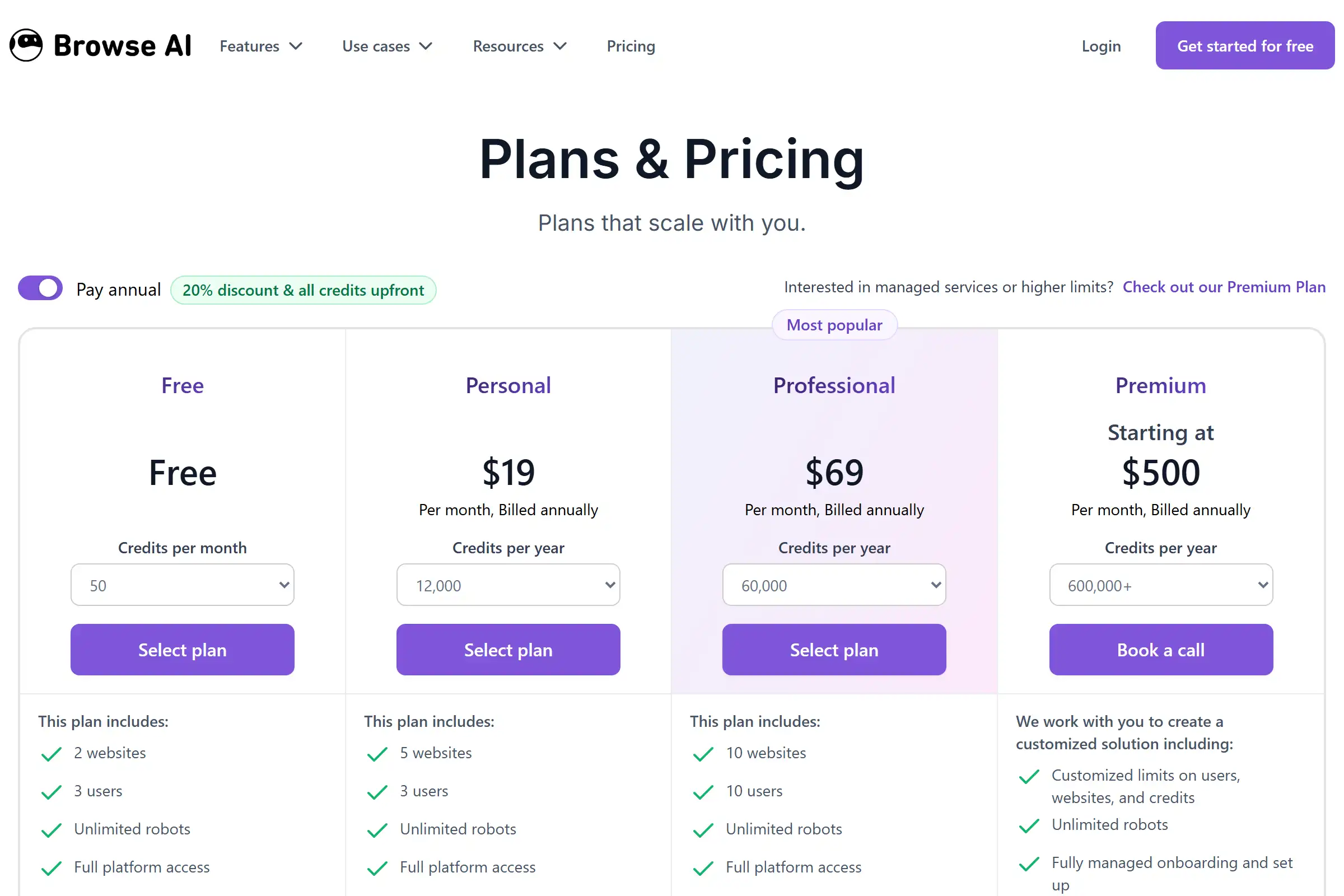
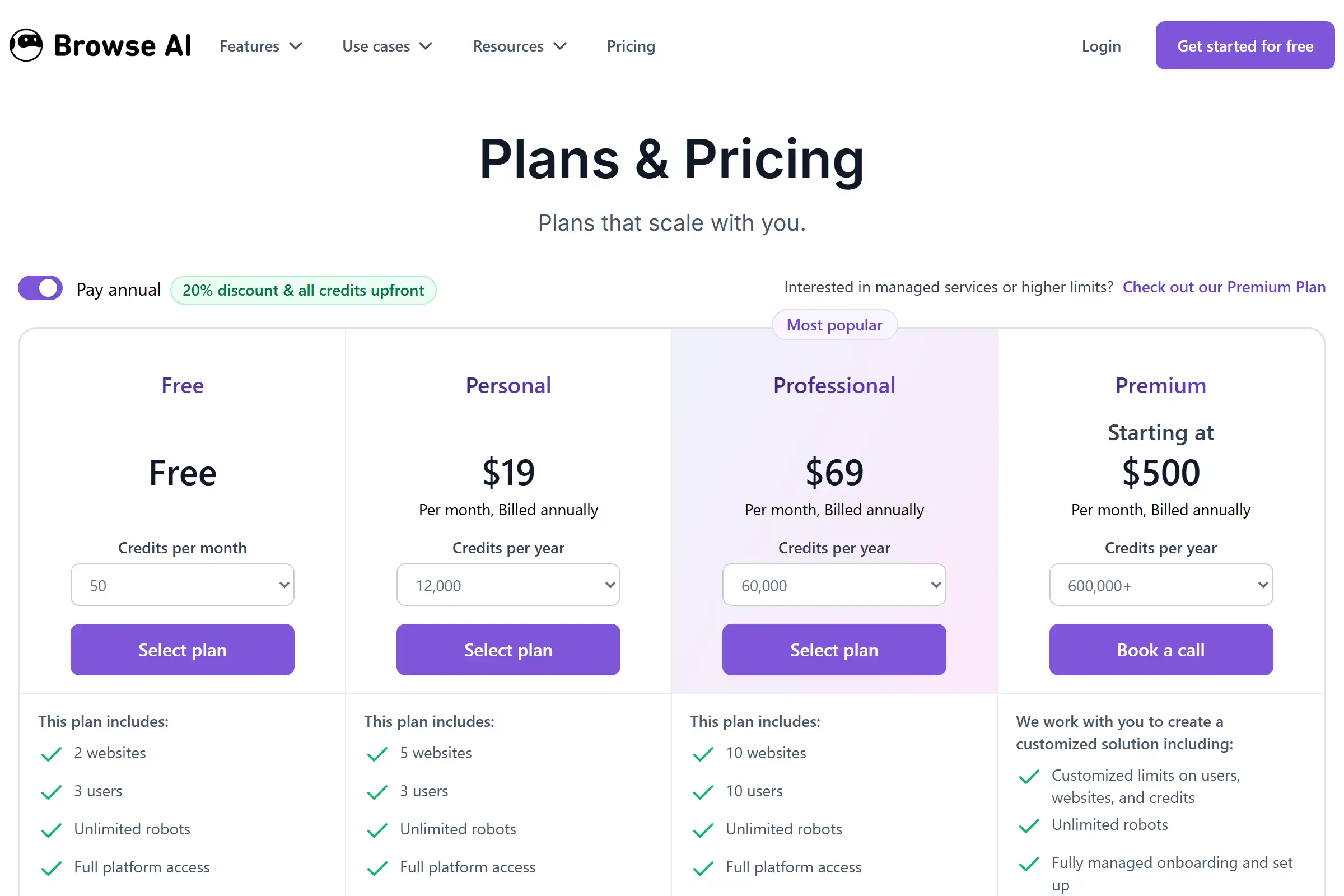
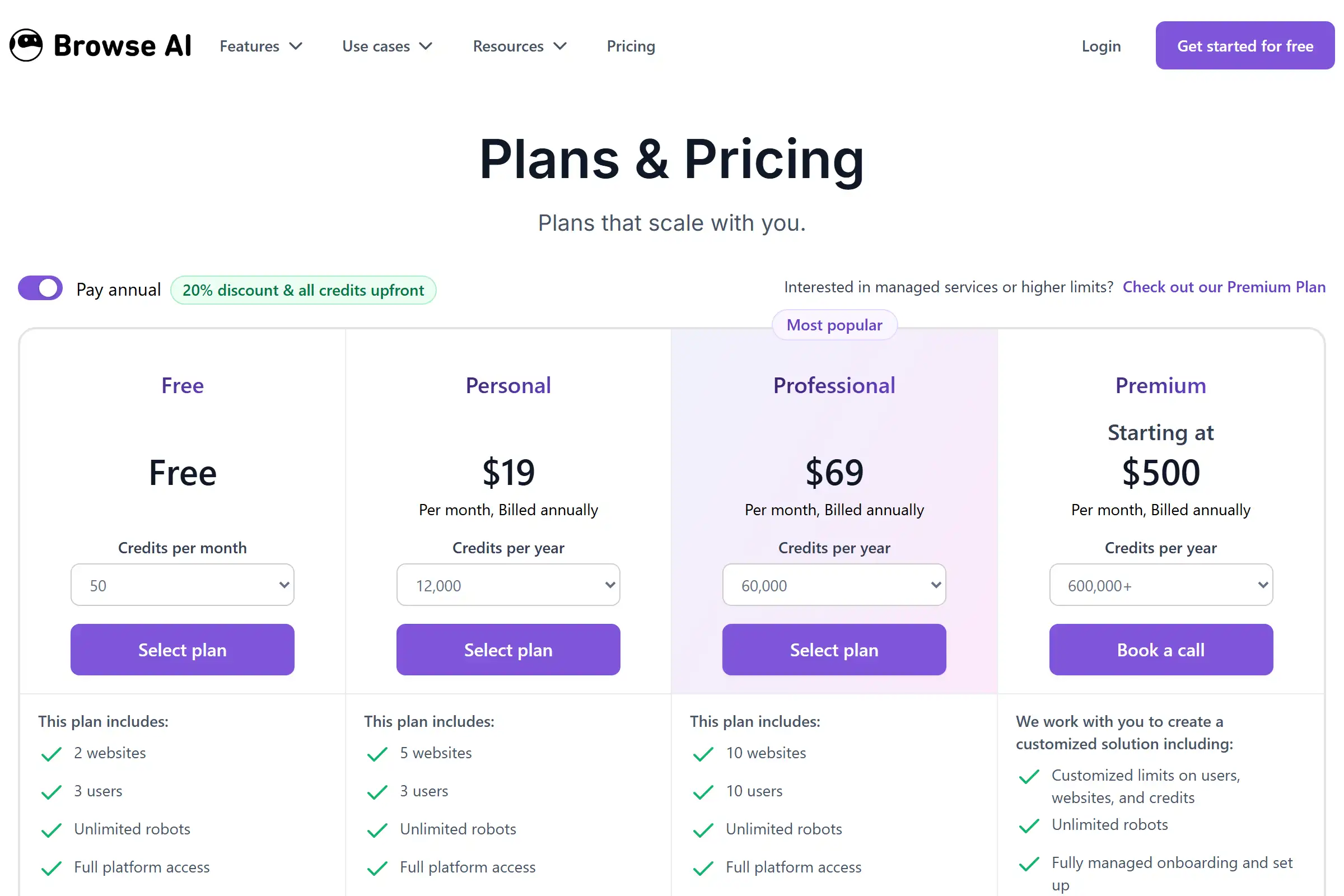
Browse AI Pricing Plans 2025
Free
Best for: Testing the platform and light personal use
- 50 credits/month (~500 rows of data)
- 2 websites
- 3 users
- Unlimited robots
- Self-healing AI
- Residential proxies
- Scheduled monitoring
- 7,000+ integrations
Value Analysis: Generous for testing — you get full platform access including self-healing AI. But 50 credits/month means roughly 5-25 scraping tasks depending on the target site. Good enough to validate your use case before upgrading.
Personal
Best for: Freelancers and small teams with regular scraping needs
- 2,000 credits/month (monthly) or 24,000/year (annual)
- 5 websites
- 3 users
- Deep scraping (JavaScript rendering)
- All integrations
- Email support
Value Analysis: At $19/month annual ($48 monthly), 2,000 credits handles roughly 200-1,000 scraping tasks per month depending on data volume. The 60% price gap between monthly and annual billing is steep — commit annually if you're sure you need it.
Professional
Best for: Growing businesses and agencies with multiple data sources
- 5,000+ credits/month (up to 360,000/year annual)
- 10 websites
- 10 users
- Priority email support
- All features from Personal
- Higher rate limits
Value Analysis: At $69/month annual ($87 monthly), you get 2.5x the credits of Personal for only 1.8x the price. Best value tier if you're scraping 10+ data sources regularly. The 10-user limit and priority support make this the sweet spot for teams.
Premium
Best for: Enterprises with high-volume or managed service needs
- 600,000+ credits/year
- Custom website limit
- Custom user limit
- Fully managed onboarding
- Ongoing data management
- Data transformation services
- Dedicated account manager
- Premium support
Hidden Costs to Watch Out For
- 1. Premium site credit multiplier: Some websites with heavy bot protection cost 2-10 credits per task, regardless of how much data you extract. Browse AI doesn't publish which sites are premium, so your actual credit consumption can be 2-10x what you expect.
- 2. No credit carryover: Unused credits expire at the end of each billing cycle. If you have a slow month, those credits are lost. Competitors like Apify allow credit rollover on annual plans.
- 3. Additional website fees: Each website beyond your plan limit costs $3-5/month. If you're monitoring 20 websites on the Professional plan (10 included), that's an extra $30-50/month.
Pro tip: Start with the free plan to test your specific use case — the 50 credits are enough for 5-25 real scraping tasks. If premium site multipliers don't affect your targets, the Personal annual plan ($19/mo) is excellent value. Count your actual credit usage for a month before committing to a higher tier.
Pros & Cons
Pros
- Self-healing AI eliminates maintenance – The single biggest advantage over every competitor. When websites redesign their pages, your Browse AI robots automatically adapt. With tools like Apify or Octoparse, a layout change means your scraper breaks until you manually fix it.
- Genuinely no-code setup – Point-and-click interface works exactly as advertised. Non-technical team members can build and manage scrapers without developer involvement. Setup for a new robot takes 5-10 minutes.
- Residential proxies included free – Every plan includes residential proxy rotation for anti-bot evasion. No need to purchase separate proxy subscriptions, which can cost $20-100/month elsewhere.
- Built-in monitoring and alerts – Schedule robots to run at any interval and get notified when data changes. Most scraping tools require separate scheduling infrastructure.
Cons
- Credit system is hard to predict – The premium site multiplier (2-10x credits) makes budgeting difficult. You won't know the true cost until you've run your robots on your specific target sites.
- No credit carryover wastes unused allocation – Credits expire each cycle. Apify and Octoparse both allow some form of credit rollover, making them more flexible for teams with variable workloads.
- Expensive at scale vs developer tools – At $87/month (Professional), Browse AI costs 2x what Apify charges ($39/month) for comparable volume. The no-code premium is significant if your team has development resources.
- 250 prebuilt robots vs Apify's 1,000+ – The robot marketplace is smaller than Apify's actor ecosystem. For niche scraping tasks, you may need to build custom robots from scratch.
Our Take
Browse AI occupies a clear niche: it's the best choice for non-technical teams who need reliable, maintenance-free web scraping. The self-healing AI is genuinely unique and solves the #1 pain point in scraping. But you pay a premium for that convenience — if your team can write code, Apify delivers more value per dollar. The credit system opacity (premium sites, no carryover) is the main frustration. Start with the free tier to measure your actual credit consumption before committing.
Is Browse AI Right for You?
Solo freelancer / researcher
Personal plan (annual billing)
Recommended: Personal
Monthly cost: $19/month (billed annually)
Saves 5-10 hours/month of manual data collection. At $50/hour consulting rate, that's $250-500/month in time saved for $19.
Small business / agency
Professional plan for team access and priority support
Recommended: Professional
Monthly cost: $69/month (billed annually)
10 team members can independently manage scraping tasks. Eliminates need for dedicated developer time on data extraction.
Enterprise / high-volume
Premium plan with managed services
Recommended: Premium
Monthly cost: $500+/month
Developer / technical team
Consider Apify instead ($39/month) for more control and lower cost at scale
Recommended: Apify (competitor)
Monthly cost: $39/month
Skip Browse AI If:
- •You have developers who can maintain custom scrapers — Apify is cheaper and more flexible
- •You only need social media data — PhantomBuster is purpose-built for LinkedIn/Twitter/Instagram
- •You scrape less than once per week — the free tier or manual methods may suffice
- •Your targets are all premium sites — credit costs can be 10x higher than expected
Browse AI Alternatives & Competitors
| Tool | Starting Price | Free Tier | Best For | Key Difference |
|---|---|---|---|---|
| CurrentBrowse AI | Free / $19-87/mo | No-code teams needing maintenance-free scraping | Self-healing AI (unique) | |
| Apify | Free / $39-999/mo | Developers needing customizable scraping at scale | 1,000+ prebuilt actors, code-first approach | |
| Octoparse | Free / $89-249/mo | SMBs wanting visual scraping with more data | Higher data limits per dollar, cloud execution | |
| PhantomBuster | $69-189/mo | Social media automation and lead generation | Purpose-built for LinkedIn/Twitter/Instagram | |
| Bardeen | Free / $10-15/mo | Browser automation beyond just scraping | Workflow automation + scraping combined |
Detailed Comparisons
Browse AI vs Apify
Your team is non-technical and you need scrapers that maintain themselves. Browse AI's self-healing AI means zero maintenance when websites change.
You have developers and need maximum flexibility. Apify's 1,000+ actors, custom code support, and lower pricing ($39/mo vs $48/mo) deliver better value for technical teams.
Browse AI vs Octoparse
You need AI-powered adaptation to website changes and built-in monitoring. Octoparse requires manual updates when site layouts change.
You need higher data volumes at a fixed price. Octoparse's $89/month plan includes more records than Browse AI's Professional tier.
Browse AI vs PhantomBuster
You need to scrape structured data from any website, not just social media platforms. Browse AI works on any site with its visual selector.
Your primary need is LinkedIn, Twitter, or Instagram automation. PhantomBuster has purpose-built templates for social media lead generation.
Frequently Asked Questions
Pricing & Credits
How does Browse AI's credit system work?
Is Browse AI free to use?
How much does Browse AI cost per month?
What are Browse AI premium sites and why do they cost more?
Features & Capabilities
What makes Browse AI different from other web scraping tools?
Does Browse AI work on JavaScript-rendered websites?
Can Browse AI monitor websites for changes automatically?
Track Browse AI Pricing
Get instant alerts when Browse AI changes pricing. Never miss an update.